
Enable Google Analytics integration to track user sessions from your website to your CozyCal booking page.
Initial Setup
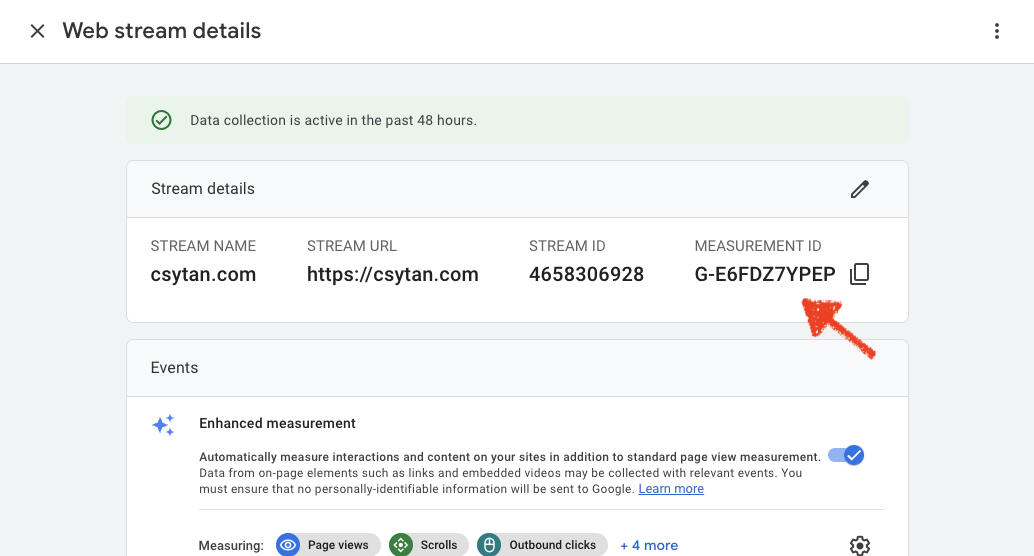
Login to Google Analytics, and copy your Google Measurement ID:
- You can find it in Admin → Data Streams (pick one) → Web data stream.
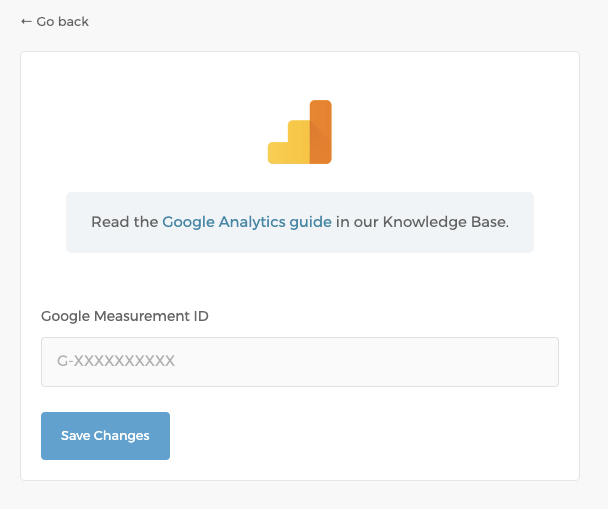
In CozyCal, go to Settings → Google Analytics, paste in your Google Measurement ID and Save.
Google Analytics Events
A quick reminder: when you are testing Google analytics integration, please make sure that any Ad Blocker installed in your browser is turned off.
The following analytics events will be sent:
page_viewevents will be sent as guests navigate your booking page- Note: For embedded booking pages, you'll need to specify your CozyCal installation URL to receive this event. Booking Page → Share button → Add to website → Javascript API → Set installed URL
cozycal_event_scheduledis sent when a booking is made
Install CozyCal on Your Website
When CozyCal is installed on your website, the embed code automatically detects if Google Analytics (gtag.js) is installed and forwards the cozycal_event_scheduled event to it. See Install CozyCal on your website.
You can also use the Javascript API to have more control into which events are sent. See the Javascript API guide.