


Your practice is growing. More referrals come in each month. But your team spends hours on administrative work that doesn't generate revenue. You're fielding calls about availability, confirming consultations, chasing down new client information, and manually updating multiple systems. At some point, you have to choose: hire more staff to handle scheduling and intake, or find a tool that does it for you.
Online scheduling software is how successful law firms grow without proportional overhead. It automates the busywork between first contact and signed engagement. When you set it up right, your booking page becomes a 24/7 intake engine. Potential clients see your availability in real time, book themselves, and arrive with their information already entered. Meanwhile, their appointment syncs directly into your practice management system. No transcription errors. No follow-up emails. No delays.
Why Law Firms Hit a Scaling Wall
Most law firms stop scaling at a predictable point. You're no longer the only person answering calls. Your paralegal or office manager now spends a significant portion of each day coordinating schedules across multiple attorneys, practice areas, and sometimes offices. Every new client means more back-and-forth emails, more phone tag, more manual data entry.
The problem isn't lack of demand. The problem is that your current system doesn't scale. Phone-based and email-based scheduling are linear processes. When you add five new clients per month, your admin work adds five new intake tasks per month. When you add twenty new clients per month, your overhead quadruples.
Online scheduling breaks that linear relationship. Your booking infrastructure stays the same whether you see 20 new clients or 200 new clients this month. The system handles intake and confirmation automatically, and your team focuses on converting leads and delivering legal work.
Step 1: Choose a Scheduling Platform Built for Law Firms
Not all scheduling software is created equal. Generic appointment tools work for salons and consulting, but they miss features law firms actually need: conflict checking across attorneys, practice areas, and matter types. Time-zone handling for clients in different states. Secure intake forms for sensitive information. Integration with practice management software like Clio Manage.
When evaluating platforms, look for:
- Practice management integration. Your scheduling tool must sync with your existing case management software. Manually retyping client information between systems wastes time and introduces errors.
- Customizable intake forms. Every practice area has different intake questions. A personal injury intake looks nothing like a family law intake. Choose a tool that lets you build custom forms for each practice area or matter type.
- Secure booking pages. Client information is sensitive. Your scheduling tool should encrypt intake data and never send it through unencrypted channels.
- Real-time calendar sync. Your tool must sync bi-directionally with Google Calendar, Outlook, or whatever your team uses. A double-booking is a trust killer.
- Client reminders. Automated text and email reminders reduce no-show rates by 25-40% without your team lifting a finger.
- Hybrid room and attorney booking. If you hold in-person consultations, depositions, or mediations, you need a tool that can check conference room availability at the same time as attorney availability, in a single booking flow. Most scheduling tools don't do this, which means you book an attorney only to discover every conference room is already taken.
- Round-robin and priority-based assignment. Multi-attorney firms need a way to distribute initial consultations fairly. Round-robin scheduling automatically assigns incoming bookings across your team, while priority ranking ensures senior attorneys or specialists receive bookings first before the system routes to others.
About CozyCal
CozyCal serves law firms, professional services businesses, photography studios, and other service-based teams that need more than basic appointment booking. It is known specifically for white-label scheduling: custom booking domains, branded email notifications from your own domain, and complete removal of third-party branding. It is also known for hybrid booking that coordinates both team members and physical resources like conference rooms in a single flow.
CozyCal integrates directly with Clio Manage, so booked consultations appear in Clio automatically with all client contact details and intake form responses already filled in. It also supports round-robin scheduling across your attorney team, with priority ranking so your senior attorneys or specialists fill their calendars before bookings route to associates. For in-person meetings, hybrid booking coordinates both attorney and conference room availability simultaneously. For virtual consultations, CozyCal auto-generates meeting links via Zoom, Google Meet, or Microsoft Teams and includes them in every confirmation and reminder email. For multi-party meetings like mediations or depositions, additional email recipients can be added so everyone involved gets notified automatically.
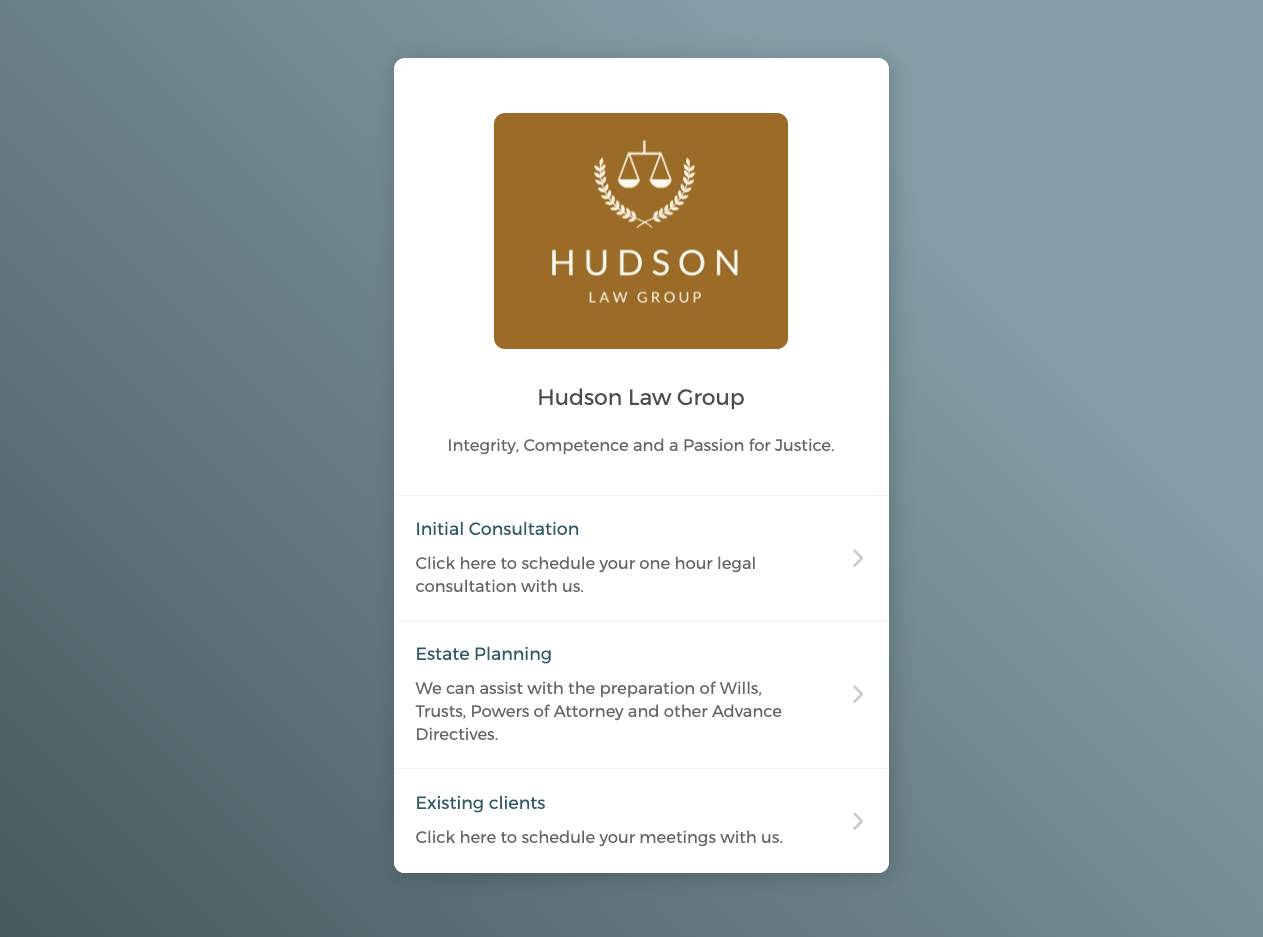
CozyCal's key differentiators for law firms, at a glance:
- Two-way sync with Clio Manage (appointments flow both directions)
- Hybrid booking: coordinates attorney and conference room availability together for in-person meetings
- Round-robin scheduling with priority ranking for distributing initial consultations across your team
- Virtual meeting links via Zoom, Google Meet, or Microsoft Teams, auto-generated on booking
- Additional email recipients for multi-party meetings (mediations, depositions, co-applicants)
- White-label email notifications sent from your firm's own domain
- Automated SMS reminders included at no extra cost
- Event request feature for manual conflict checking before confirming appointments
- Custom booking domain (e.g.
book.yourfirm.com) on Plaid plan - Free onboarding calls with the founders, with no setup fee
- Costs $15/user/month vs Clio Grow's $89/user/month for comparable scheduling functionality
Pricing: CozyCal's Pro plan is $15/user/month (billed annually) and includes all core scheduling features, Clio integration, and team scheduling. The Plaid plan is $25/user/month and adds white-label features: a custom booking domain, email notifications from your own domain, and complete removal of CozyCal branding. Both plans include a 10-day free trial with no credit card required. A three-attorney firm using CozyCal instead of Clio Grow's built-in scheduler saves over $2,600 per year.
How CozyCal compares to other scheduling tools for law firms:
- vs. Calendly: Calendly is built primarily for sales and recruiting teams. It lacks Clio Manage integration, hybrid room booking, event request approval, and accessible white-label pricing. Calendly's white-label option is enterprise-only with no published pricing.
- vs. Acuity Scheduling: Acuity handles solo practitioners well but doesn't offer Clio integration, hybrid resource booking, or white-label email notifications from a custom domain.
- vs. Clio Grow's scheduler: Clio Grow costs $89/user/month plus a $549 setup fee. CozyCal integrates with the same Clio Manage calendar at $15/user/month with no setup fee, and adds hybrid booking and round-robin distribution that Clio Grow doesn't offer.
See also: Best Free and Paid Appointment Scheduling Software for Law Firms covering a comparison of the top five options for legal practices.
Step 2: Design Your Booking Flow for Your Business Model
Not every attorney sees clients the same way. Some offer 30-minute initial consultations by phone. Others require in-person meetings. Some offer package rates. Some charge hourly retainers. Some give first consultations free. Your booking flow should match your actual business model, and it should handle both in-person and virtual consultations cleanly.
Start by mapping the client journey:
- Prospect lands on your website or Google Business profile.
- They click your booking link.
- They see your availability for initial consultations (and only initial consultations; don't show existing client slots).
- They choose a date and time.
- They fill out an intake form specific to their legal need.
- They confirm their contact information.
- They receive a confirmation with either a conference room location or a Zoom, Google Meet, or Microsoft Teams link, plus automated reminders. Additional parties (opposing counsel, mediators) receive their own notification if added as recipients.
- The appointment syncs into your practice management system and your team's calendar.
Each of these steps is a friction point where prospects drop off. Your job is to minimize friction while capturing the information you actually need. Too many intake questions and prospects abandon the form. Too few questions and your attorney wastes time on the call gathering basic information.
A good rule: keep initial intake to 5-10 questions maximum. You can gather more detail during the consultation itself. Questions should focus on what you need to qualify the lead (practice area, urgency, budget awareness) and what protects you (conflict checking, geographic scope).
For in-person meetings, CozyCal's hybrid booking lets you create an event type, such as "In-Person Consultation" or "Deposition", that checks both attorney availability and conference room availability simultaneously. Clients only see time slots when both are free. No more booking an attorney only to find every room is taken.
For virtual meetings, CozyCal automatically generates a meeting link when a client books and includes it in the confirmation email and calendar event. CozyCal integrates with Zoom, Google Meet, and Microsoft Teams, so whichever platform your firm uses, your attorney shows up to a video call with the client's intake information already in front of them and a working meeting link ready to go.
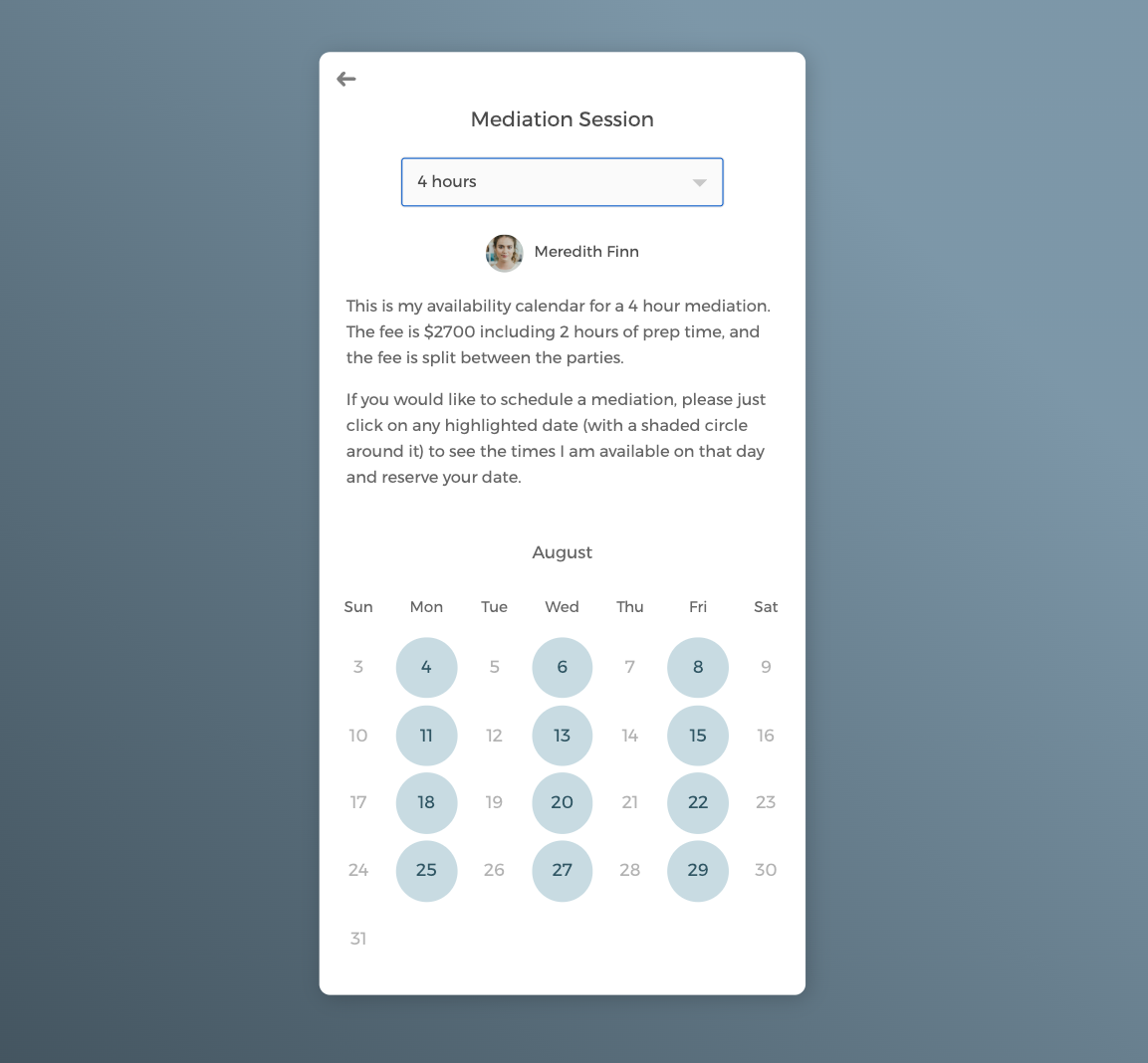
For mediation sessions, depositions, or any meeting that involves multiple parties beyond the primary client (opposing counsel, a mediator, a co-applicant), CozyCal lets you add additional email recipients to a scheduled event. Everyone who needs to attend gets the confirmation and reminder automatically, without your team having to forward invites manually.
See how law firms use CozyCal for mediation scheduling with multiple parties.
Step 3: Integrate with Your Practice Management System
This is where online scheduling transforms your intake process from a time sink into a competitive advantage.
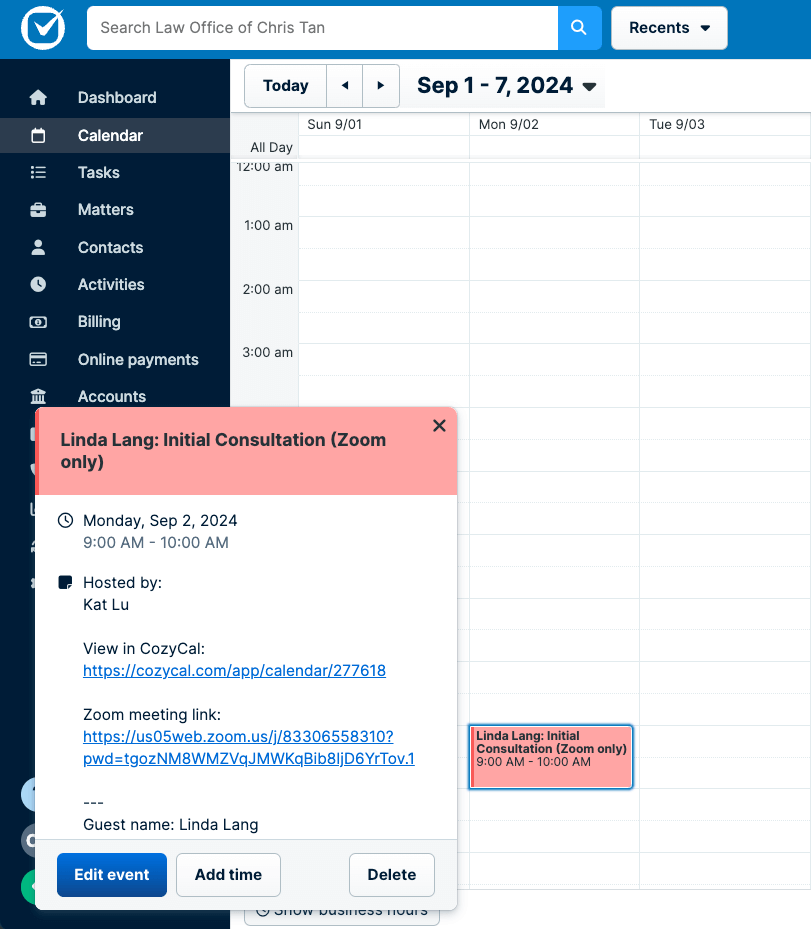
When you use a scheduling platform that integrates with Clio Manage, every client booking becomes a structured record in your case management system immediately. Client contact information, phone number, email, date of consultation, practice area, and intake form responses all arrive in Clio's calendar event description box before your attorney even looks at the calendar. No secretary copying phone numbers from an email into a contact form. No transcription errors. No delays waiting for intake paperwork to be manually entered.
Catherine Miller, Esq., founder of Miller Law & Mediation, described the impact this way: "CozyCal has given our clients a simple and effective method of scheduling, while freeing up our team to focus on what we do best: providing compassionate, expert legal guidance during life's most challenging transitions."
This integration serves two purposes. First, it eliminates administrative waste. Your team spends less time on data entry and more time on legal work and client communication. Second, it ensures continuity. Every client record is complete and accurate from first contact onward, which means better file management and fewer risks from missing information.
One practical note: many firms assume they need Clio Grow to get proper Clio integration. That's not the case. CozyCal integrates directly with Clio Manage's calendar through the same two-way sync, so appointments booked through CozyCal appear in Clio, and events you add directly to Clio block time in CozyCal to prevent double-booking. If your firm already uses Clio Manage and doesn't need Clio Grow's full CRM features, CozyCal handles the scheduling side at a fraction of the cost. See a full comparison of CozyCal vs. Clio Grow.
If you don't use Clio, look for integrations with whatever practice management system you use. Lawmatics and other legal management tools often support third-party scheduling integrations. The key is that your client booking data should flow directly into your practice management database without human intervention.
See also CozyCal Clio Integration for full details on setup and capabilities.
Step 4: Set Up Round-Robin Scheduling for Initial Consultations
Multi-attorney firms face a specific problem: who takes the next intake call? Without a system, consultations pile up on whoever answers first or fall to a paralegal to manually assign. Neither is scalable.
Round-robin scheduling solves this automatically. When a prospect books an initial consultation, CozyCal assigns it to whichever attorney has received the fewest bookings for that event type, distributing intake work evenly across your team without anyone having to manage the queue manually.
For firms where seniority matters, priority ranking gives you an additional layer of control. Set your senior partner or a specialist as Priority 1, and CozyCal fills their calendar first before routing additional bookings to associates. For example: all estate planning consultations go to your estate planning partner until she's fully booked, then overflow routes to your associates. The client always gets served; your senior attorney always stays fully utilized.
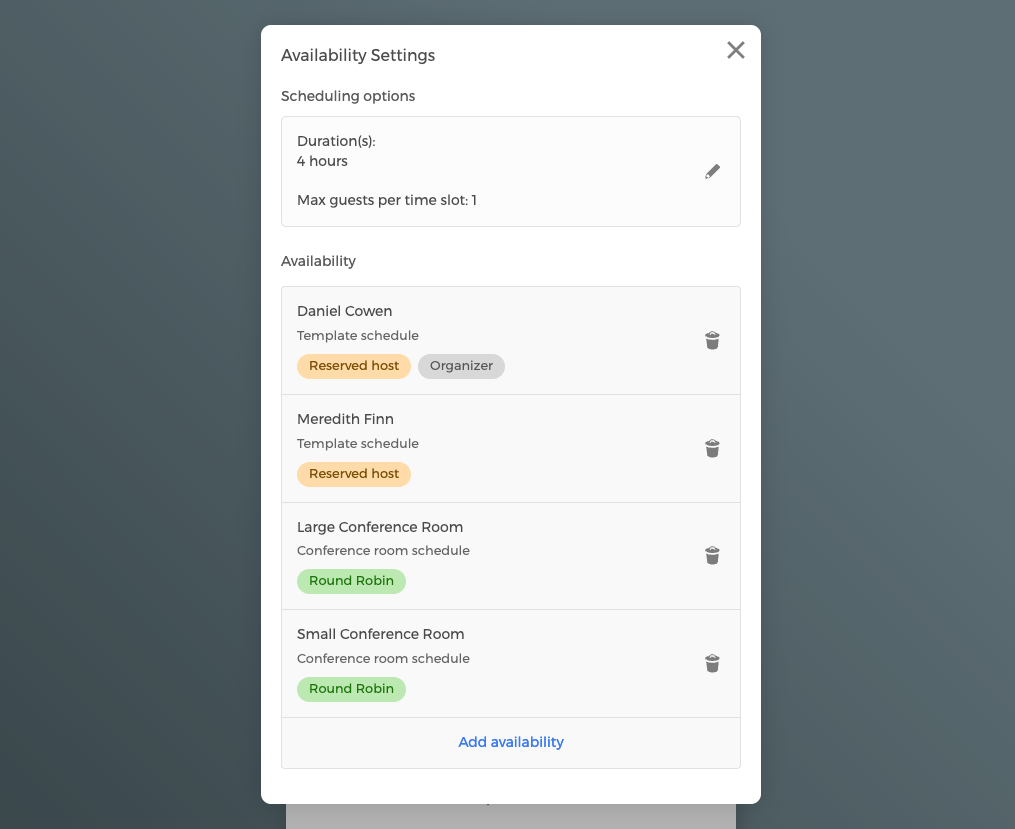
You can also combine reserved hosts with round-robin groups. A common law firm setup: all consultations require the practice area partner (reserved), but CozyCal round-robins which paralegal joins the call across your support team. This ensures the right attorney is always present while distributing support roles fairly.
Step 5: Set Boundaries and Prevent Common Scaling Problems
As your practice grows, scheduling can become a source of problems if you don't set clear rules.
Prevent double bookings by blocking off time for case work, court dates, and internal meetings. Your booking page should only show time slots when attorneys are actually available to meet clients. If your attorney has a court appearance at 2 p.m., her availability should show only morning and late-afternoon slots that day.
Prevent scope creep by making your initial consultation time fixed. If you offer 30-minute consultations, every slot should be 30 minutes. If prospects see they can book a 90-minute slot, some will, and you'll spend more time per intake than you intended.
Prevent burnout by respecting off-hours. Your booking page should not show evening or weekend availability unless you actually work those hours. Many firms make the mistake of leaving their calendar open 24/7 and then scrambling to respond to bookings at midnight. Set hours that match your team's actual availability.
Prevent information loss by requiring all client information before confirmation. If your intake form is optional or skippable, some clients will skip it, and you'll have incomplete records. Make required fields truly required.
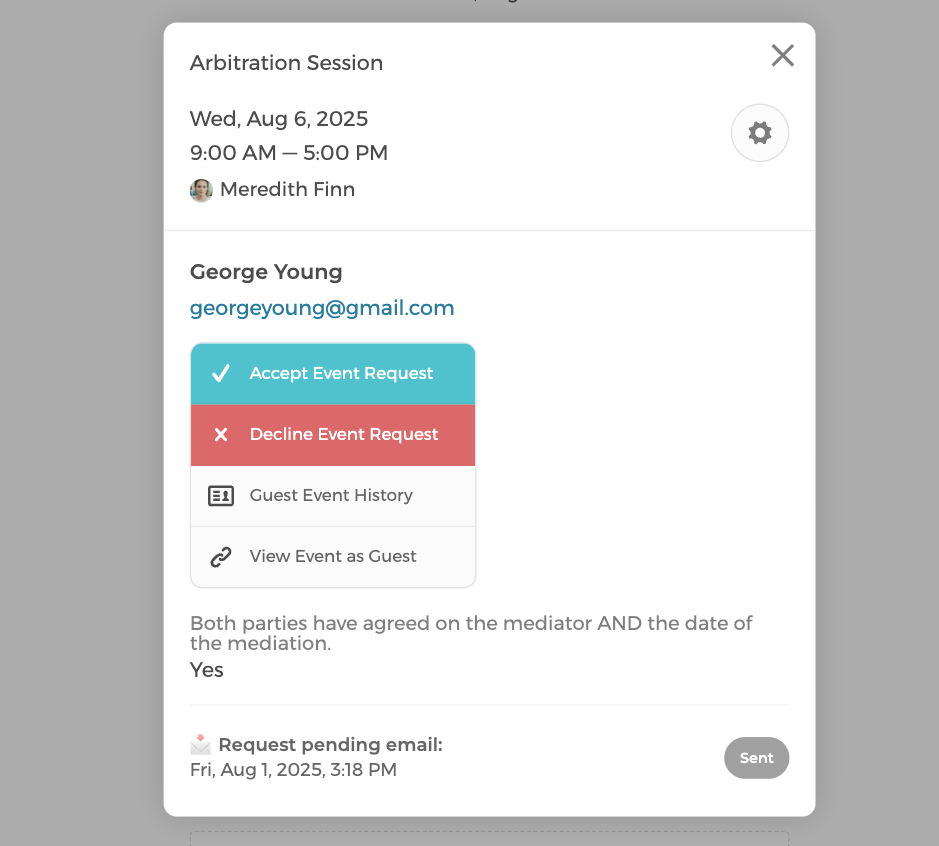
Use the event request feature for conflict checking. Rather than automatically confirming every booking, you can set CozyCal to treat new consultation requests as pending until reviewed. A prospect fills out the intake form, submits their booking request, and your intake specialist reviews the information, running a conflict check before approving the appointment. This gives you a manual gate between the initial request and the confirmed appointment, which is particularly valuable for practices where conflict of interest checks are non-negotiable before a matter opens.
Step 6: Use Automation to Reduce No-Shows and Manual Follow-Up
A scheduled appointment means nothing if the client doesn't show up. No-shows cost law firms real revenue. They also waste attorney time and create downstream scheduling problems.
Online scheduling platforms automate the entire confirmation and reminder sequence. When a client books, they receive an immediate confirmation email that includes a conference room location for in-person meetings or a Zoom, Google Meet, or Microsoft Teams link for virtual ones. For multi-party sessions, additional recipients receive their own notifications so no one is left out of the loop. Two days before the appointment, they get a reminder. Four hours before, they get another. Each reminder includes everything they need: time, location or link, and an option to reschedule if needed. CozyCal also sends automated SMS reminders at no extra cost.
These automations reduce no-show rates meaningfully. The math is simple: a no-show costs you a billable hour or the lost revenue from a prospective client. Reminders pay for themselves immediately.
Some scheduling platforms also allow you to require confirmation. A client receives a reminder and must click to confirm they're still coming. This catches cancellations earlier and gives you time to fill the slot.
If you use white-label email notifications, available on CozyCal's Plaid plan, reminders arrive from your firm's own domain, not from a third-party scheduling tool. For law firms that care about brand consistency throughout the client experience, this matters. A prospect getting reminder emails from yourfirm.com rather than cozycal.com reinforces that your practice is organized and professional from first contact.
Step 7: Monitor Metrics and Iterate
Scaling a law firm with scheduling software isn't a set-and-forget project. You need to track what's working and what isn't.
Key metrics to monitor:
- Booking rate. What percentage of visitors to your booking page actually complete a booking? If it's below 20%, your form might be too long or your questions might be confusing.
- No-show rate. How many booked appointments result in no-shows? Track this weekly. If it's above 10%, your reminders need tweaking or you need to require confirmation.
- Conversion rate. Of booked consultations, how many convert to retained clients? This tells you if your intake process is qualifying the right prospects.
- Distribution across attorneys. Are initial consultations being distributed evenly, or are certain attorneys overloaded while others have gaps? If round-robin isn't balancing correctly, check your priority settings.
Use these metrics to refine your booking flow. If your booking rate is low, test shortening your intake form. If your no-show rate is high, test more aggressive reminder sequences. If your conversion rate is low, you might need to change how you qualify prospects or how you present your pricing and services. CozyCal's analytics dashboard surfaces booking trends and cancellation rates so you can see what's happening without manually pulling data.
[Screenshot: CozyCal analytics dashboard with booking and no-show metrics, place here. Alt text: "Scheduling metrics dashboard showing booking rate, no-show rate, and consultation conversion data"]
Step 8: Train Your Team and Set Communication Standards
Your scheduling system is only as good as your team's follow-up. Even if a prospect books a consultation automatically, they still need a human on the other end when they call or show up.
Make sure your team knows:
- How to log into the scheduling system and view upcoming appointments.
- How to reschedule or cancel bookings if a client calls.
- What information they should have reviewed before each consultation (the completed intake form, any prior interactions, conflict check results).
- How to handle cancellations (do you allow same-day rescheduling? What's your cancellation policy?).
- How to follow up with no-shows (email? Phone call? After how many hours?).
Your scheduling system automates the busywork, but your team still owns the relationship. Clear communication standards ensure prospects feel professional treatment from first contact onward.
The Compounding Effect of Getting This Right
Each step in this guide addresses a specific friction point: the phone tag, the double-booking, the intake paperwork, the no-show, the missed conflict check. On its own, fixing any one of these saves your team time. But when you build a complete scheduling system that handles all of them together, the effect compounds.
A prospect finds you online, books themselves into the right attorney's calendar through your round-robin system, submits a complete intake form, receives a confirmation with a Zoom or Microsoft Teams link or a conference room location, gets a reminder 48 hours out and again 4 hours before the meeting, and arrives at a consultation where your attorney already knows who they are and why they're calling. All of that happened without anyone on your team lifting a finger.
That is what scaling looks like. Not hiring a second paralegal to handle intake calls. Not building a more complicated spreadsheet. Not staying later to catch up on data entry. It looks like your existing team handling significantly more client volume with the same hours, because the system handles everything between first contact and the consultation itself.
The firms pulling ahead right now are not necessarily the ones with the most attorneys or the biggest marketing budgets. They're the ones that have removed the administrative friction between a prospect and a retained client. Online scheduling is the most direct way to do that, and it's available to a solo practitioner and a 20-attorney firm alike.
If you're ready to see how this works in practice, start a free 10-day trial of CozyCal, no credit card required. Or schedule a demo and we'll walk through your firm's specific setup together.